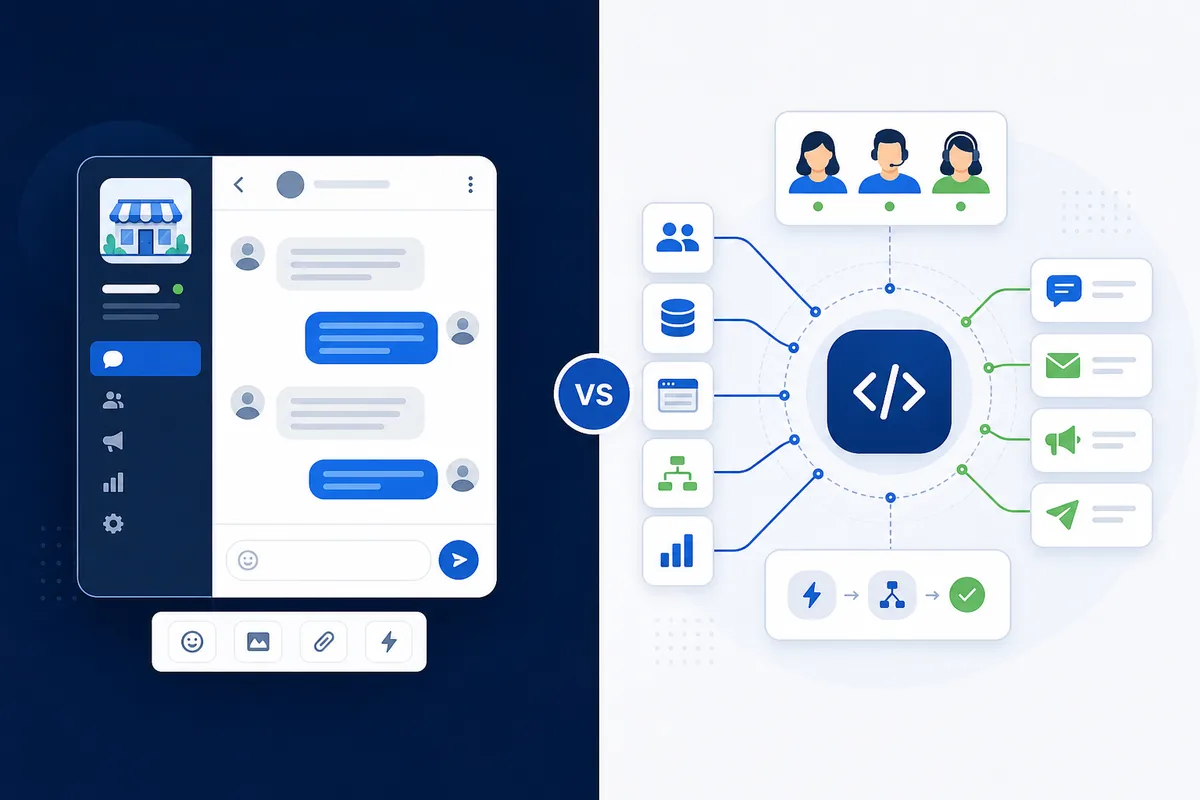
Meta provides WhatsApp business messaging options for different operational needs, including the WhatsApp Business App and the WhatsApp Business Platform. The Business App gives a business a dedicated messaging presence, while the Business Platform provides programmatic access for integrations and structured workflows.
WhatsApp Business API is a commonly used term for API-based capabilities available through the WhatsApp Business Platform. This guide uses both terms naturally while referring to the Business Platform as the official product.
What Is the WhatsApp Business App?
The WhatsApp Business App is designed for businesses that want a dedicated WhatsApp presence with business information and messaging tools without building API-based integrations.
It can support direct customer conversations, a business profile, product or service information and basic messaging tools. It is a practical option when one person or a small team handles a manageable number of conversations directly.
For businesses with relatively straightforward communication requirements, the Business App may be sufficient.
What Is WhatsApp Business API?
WhatsApp Business Platform provides API-based business messaging capabilities for organizations that need structured messaging, integrations, automation, message templates or more scalable customer communication.
The Platform can connect messaging with CRMs, websites and other systems where suitable APIs are available. Depending on the selected solution, it can also support shared team workflows, approved message templates, campaign management, chatbots and WhatsApp Flows.
Businesses evaluating implementation and support can explore Weform Solution's WhatsApp Business API services in Bangalore.
WhatsApp Business App vs WhatsApp Business API
The main difference is that the Business App supports direct app-based messaging, while the Business Platform adds API access for integrations, automation and structured workflows.
| Requirement | WhatsApp Business App | WhatsApp Business Platform |
|---|---|---|
| Basic customer messaging | Yes | Yes |
| Suitable for small teams | Yes | Yes, depending on setup |
| API integrations | Not designed for API integrations | Yes |
| CRM integration | Limited or manual | Yes |
| Multi-agent workflows | Limited | Yes |
| Message templates | Limited app capabilities | Yes |
| Automated workflows | Basic | Advanced |
| Chatbot integration | Limited | Yes |
| Business-system integration | Limited | Yes |
| Campaign management | Limited | Yes, through suitable platforms |
| Custom workflows | Limited | Yes |
| Developer or API access | No | Yes |
Capabilities can depend on the selected platform, provider, integration and current WhatsApp Business Platform features.
Who Should Use WhatsApp Business App?
The WhatsApp Business App can be a practical choice for smaller businesses that mainly need direct customer conversations and do not require complex integrations or automation.
Suitable examples include small shops, individual professionals, local service businesses and small teams handling limited conversations. It can also suit a business that does not need CRM connectivity, API access or structured notification workflows.
Moving to the Business Platform should be based on an operational requirement rather than simply because the API has more features.
Who Should Use WhatsApp Business API?
WhatsApp Business Platform becomes more useful when customer communication needs to connect with teams, systems, automation or structured messaging workflows.
Possible users include ecommerce businesses, schools and colleges, healthcare businesses, real estate companies, travel companies, clubs and associations, customer-support teams, SaaS businesses and organizations using CRMs. It can also support businesses that need structured customer notifications, subject to applicable rules and the selected setup.
Company size alone does not decide suitability. A smaller organization may have a strong API use case, while a larger business with simple messaging may not need every Platform capability.
Can Multiple Team Members Use WhatsApp Business API?
Yes, WhatsApp Business Platform can support multi-user customer communication through suitable messaging platforms and team-inbox solutions.
A shared setup may allow conversations to be assigned, routed or managed by sales and support teams. This can make lead management and customer service easier than relying on one person to handle every message.
Exact multi-agent capabilities depend on the platform or solution used with the WhatsApp Business Platform.
Can WhatsApp Business API Automate Customer Conversations?
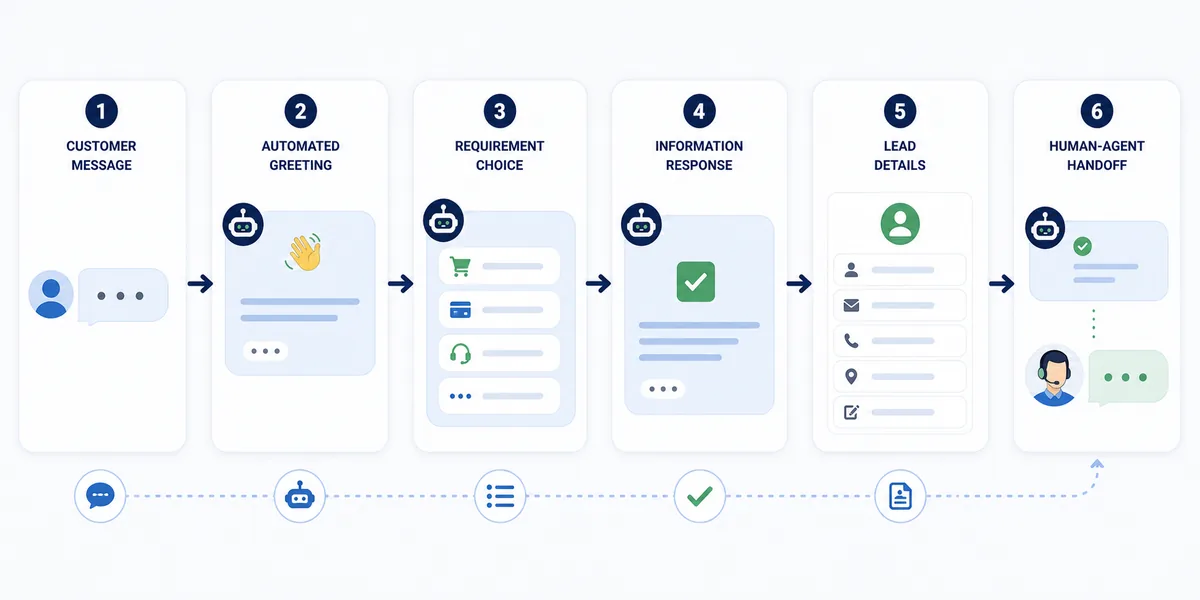
Yes. Businesses can use automation for suitable workflows such as FAQs, lead capture, service information, appointment requests, status updates and routing conversations to the appropriate team.
Automation works best when repetitive interactions are automated while customers still have a clear path to human support where appropriate.
What Are WhatsApp Message Templates?
Message templates are structured messages used for eligible business-initiated communication through WhatsApp Business Platform.
Marketing
Promotions, offers, product announcements and eligible re-engagement messages.
Utility
Order updates, appointment updates, payment confirmations and service notifications.
Authentication
OTP, login verification and account-verification messages.
Template classification and approval are determined according to WhatsApp Business Platform rules.
Can Businesses Send WhatsApp Campaigns Using the API?
Businesses can use approved marketing templates for eligible promotional communication through WhatsApp Business Platform, subject to WhatsApp's messaging rules and appropriate customer permission.
Responsible uses can include offers, new-product announcements, events, renewal reminders and customer re-engagement. Businesses should communicate only with users they are permitted to contact and should follow applicable WhatsApp business messaging requirements.
What Can WhatsApp Business API Integrate With?
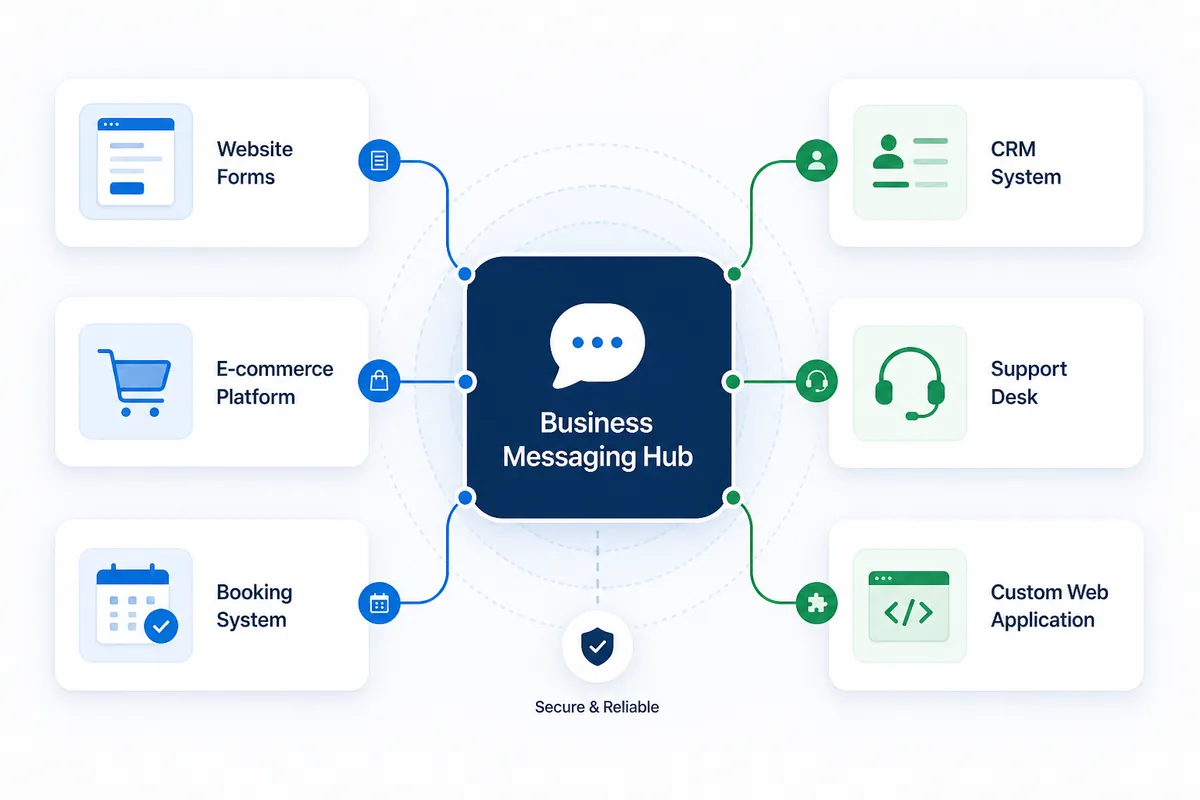
WhatsApp messaging can be connected with other business systems when suitable APIs and integration capabilities are available.
Potential connections include website forms, CRM, ecommerce platforms, ERP, booking systems, support desks, lead-management systems and custom web applications. The exact scope depends on the systems, API access and approved workflow.
For broader technical planning, review our web development service and web application development capabilities.
Does WhatsApp Business API Cost More Than the Business App?
The cost structure is different. WhatsApp Business Platform can involve Meta messaging charges as well as platform, provider, setup, integration or support costs depending on the solution used.
Meta currently applies per-message pricing to delivered template messages, with charges depending on factors such as message category and destination market. WhatsApp Business Platform pricing and policies can change, so businesses should verify current Meta and provider charges before implementation.
The Business App and Platform should not be compared on price alone. The Platform's additional cost may only make sense when its operational capabilities solve a real business requirement.
Can You Use an Existing WhatsApp Business Number With the API?
In supported onboarding scenarios, an existing WhatsApp Business app number may be onboarded to the WhatsApp Business Platform. The exact process depends on the current account configuration, provider setup and Meta requirements.
The business should confirm number ownership, the existing configuration, supported onboarding process and operational requirements before making changes. Eligibility should not be assumed for every number.
Can You Change WhatsApp API Providers Later?
Eligible WhatsApp Business Platform numbers may be migrated between providers or solution partners, subject to the current account setup and Meta's migration requirements.
Before selecting a provider, understand who owns the WhatsApp Business Account and phone number, what the provider arrangement permits, how migration works and what happens to platform data or workflows if the provider changes.
Weform Solution can help businesses examine WhatsApp API migration support based on their current setup.
Which Option Is Right for Your Business?
Choose the Business App for simpler direct messaging; consider the Business Platform when communication must connect with systems, automation or structured team workflows.
| If your business needs... | Consider |
|---|---|
| Simple direct customer messaging | WhatsApp Business App |
| Small-team communication | WhatsApp Business App |
| API integrations | WhatsApp Business Platform |
| CRM integration | WhatsApp Business Platform |
| Multiple-agent workflows | WhatsApp Business Platform |
| Automated customer journeys | WhatsApp Business Platform |
| Structured template messaging | WhatsApp Business Platform |
| Business-system integration | WhatsApp Business Platform |
A business should choose based on operational requirements rather than simply selecting the option with the longest feature list.
Signs Your Business May Be Ready to Move From the App to the API
A move may be worth evaluating when manual messaging no longer supports the team's customer communication process efficiently.
These signs justify an assessment, not an automatic migration.
Questions to Ask Before Choosing a WhatsApp API Solution
A useful comparison should cover ownership, charges, capabilities, migration and support—not only the provider's feature list.
Need Help With WhatsApp Business API?
If your business has outgrown simple WhatsApp messaging and needs templates, campaigns, automation, integrations, migration or multi-agent workflows, Weform Solution can help assess the requirement and identify a suitable WhatsApp Business Platform setup.
For businesses in Bangalore and Bengaluru, explore our commercial WhatsApp Business API service page.
Key Takeaways
- WhatsApp Business App is suitable for simpler business messaging requirements.
- WhatsApp Business Platform is designed for API integrations, automation and structured communication.
- Neither option is automatically better for every business.
- Platform templates include marketing, utility and authentication categories.
- Meta messaging charges and provider or platform costs should be reviewed before implementation.
- Businesses should evaluate ownership, migration, integrations and support before choosing a solution.
Frequently Asked Questions
Is WhatsApp Business API the same as WhatsApp Business App?
No. The Business App is an application for business messaging, while WhatsApp Business Platform provides API-based capabilities for integrations, templates, automation and scalable workflows.
Is WhatsApp Business API only for large companies?
No. Suitability depends more on communication requirements than company size. A smaller business may benefit from the API if it needs automation, integrations or multi-agent workflows.
Can WhatsApp Business API connect to a CRM?
Yes, where the CRM and selected WhatsApp solution provide suitable integration capabilities.
Can WhatsApp Business API send promotional messages?
Yes, eligible promotional communication can use approved marketing templates subject to WhatsApp's messaging rules and appropriate customer permission.
Can WhatsApp API send OTP messages?
Yes. Authentication templates can be used for supported verification and one-time-password use cases.
Can I use my existing number?
Existing numbers may be eligible for supported onboarding or migration depending on their current setup and Meta requirements.
Can multiple agents use WhatsApp Business API?
Yes, suitable platforms can provide shared team workflows for managing customer conversations.
Is WhatsApp Business API free?
WhatsApp Business Platform can involve Meta messaging charges as well as provider, platform, setup, integration or support costs depending on the solution.
References
Published by Weform Solution
Weform Solution provides website development, business messaging and digital solutions for businesses. Learn more about Weform Solution.
Discuss Your Business Messaging Requirement
Share your team, messaging, automation and integration needs. Weform Solution can help you evaluate a practical next step.