Wholesale ordering mobile app and web administration system.
A connected solution for customers to place wholesale orders through a mobile app and for the business to manage products, pricing, customers and orders through a web application.
Weform Solution developed the mobile application, web administration application and backend end to end, and continues to manage and maintain the solution. The client is kept anonymous.
Wholesale buying involves more than selecting a product. Customers need to choose pack sizes, understand quantity-based rates, build an order and select a delivery address. The business needs a separate workspace to manage the catalogue and review incoming orders.
This project brings those roles together through a customer-facing mobile app and a browser-based administration application, supported by a backend. Each interface serves a different part of the same business workflow.
The business requirements behind the application
The solution needed to represent the details of wholesale buying: a product can have different pack sizes, customers order in quantities, and the applicable rates depend on the buying options. A buyer needs that information before preparing an order. The administration team needs an organized way to maintain it.
Customer information and order records also need context. When reviewing a customer, the business should be able to see the account, saved addresses and associated orders. When reviewing overall activity, the team needs a summary of customers and orders without opening every individual record.
Make products, pack choices and wholesale rates understandable to mobile buyers.
Connect product selection, cart review and delivery-address selection in one ordering journey.
Give administrators a separate workspace for catalogue and customer management.
Present order activity at both dashboard and individual-customer level.
The mobile application: product selection to order history
The mobile experience gives buyers a way to browse products and prepare their wholesale orders.
Browse product images, descriptions and available pack sizes.
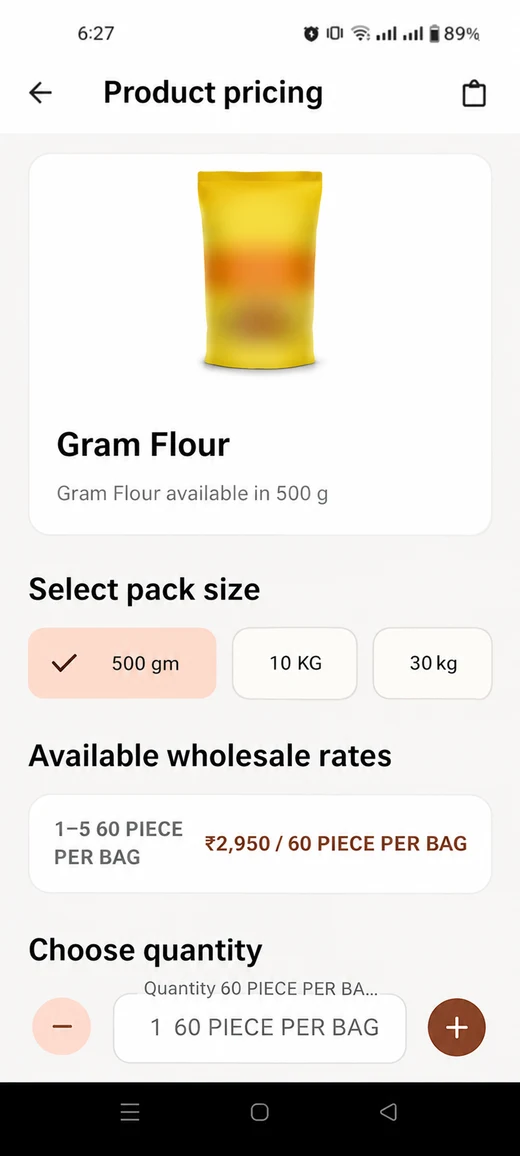
View wholesale rates for different quantity ranges.
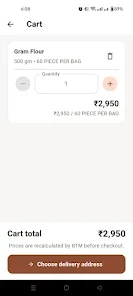
Select quantities and review products and totals in the cart.
Choose and manage delivery addresses.
Place orders and view previous orders through order history.
Pack selection and pricing are part of the buying journey, helping customers review the options associated with the products they choose.
Product discovery and buying options
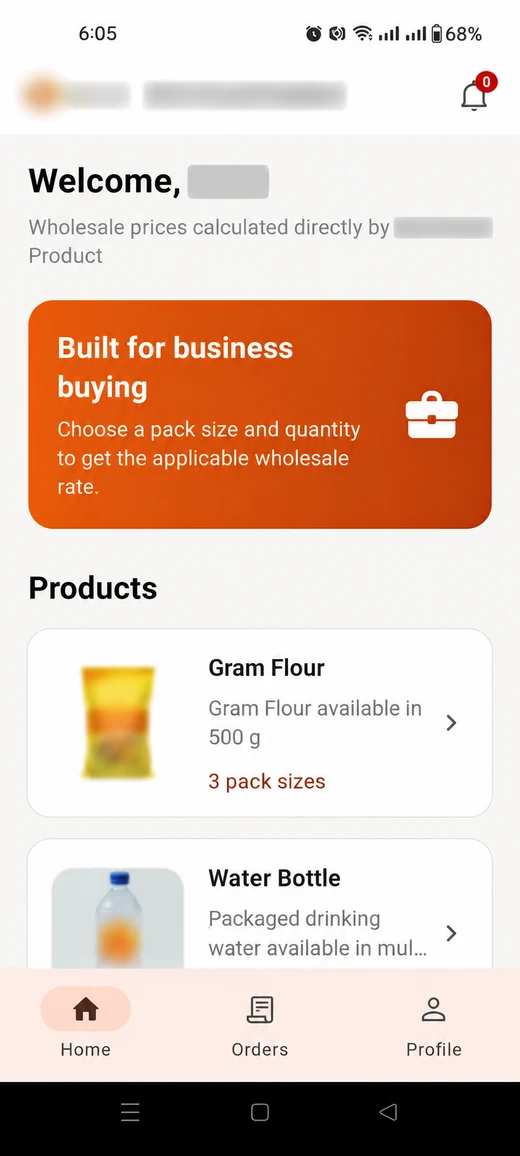
The catalogue introduces the available products through images and descriptions. On the product screen, the buyer can review pack-size options and wholesale-rate ranges before choosing a quantity. These details are useful for a business buyer comparing a small purchase with a larger order.
Cart review and delivery details
The cart brings selected items together for review. Buyers can check quantities and totals before choosing a delivery address. Address management is part of the application, so the destination is connected to the ordering journey rather than left as an unrelated message.
Access to previous orders
Order history gives the buyer a place to review previous purchases. This provides a continuing account experience beyond the first product selection and helps customers refer back to the orders they have placed.
Inside the mobile ordering application
These edited views show the catalogue, pack-size and wholesale-rate selection, and cart. Identifying details have been obscured; some visual details may differ from the original screenshots.
Product cataloguePack sizes and wholesale pricingCart and quantity review
The web application: a workspace for the business team
The web administration application gives the business a dedicated interface for managing the information and activity behind the mobile app.
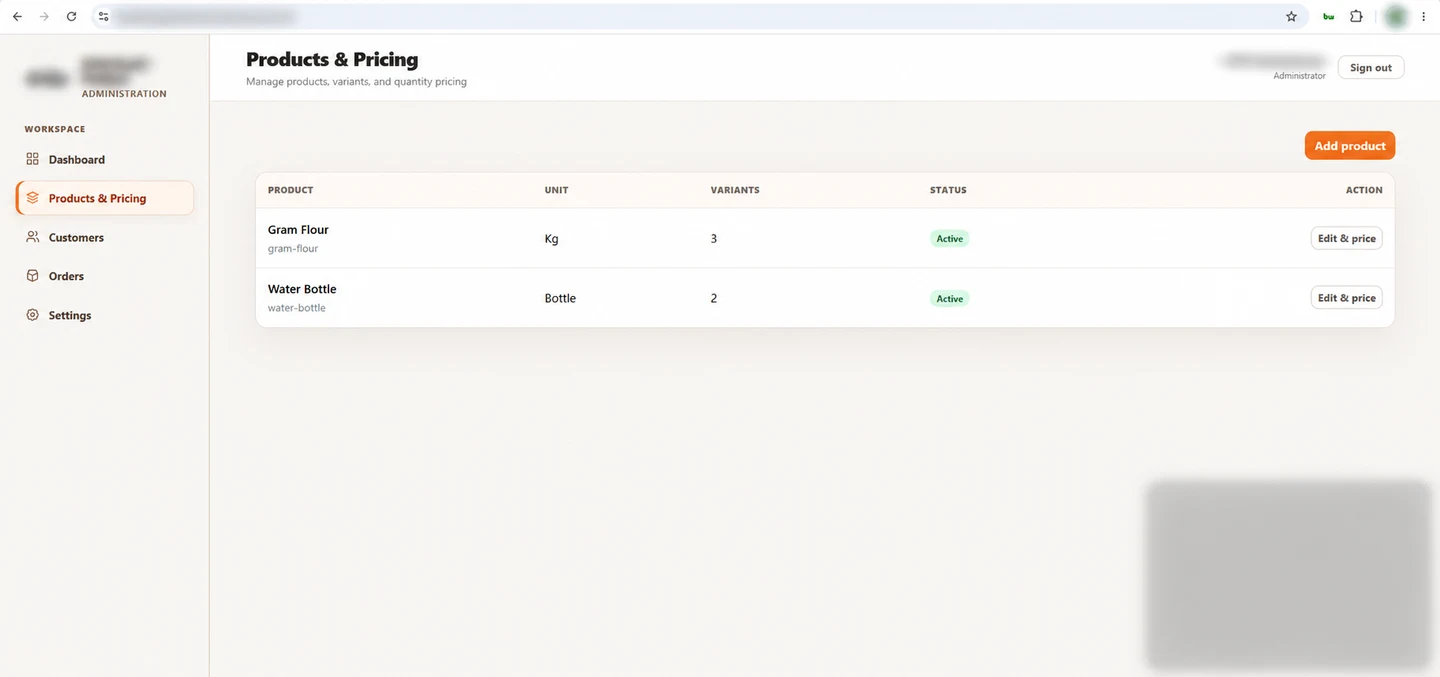
Products and pricing: create product records with a name, unit, description, image and active status, and manage wholesale pricing.
Customer management: search registered buyers by name, mobile number or business, and review account status.
Customer records: view customer details, saved addresses and associated order history, with an account deactivation option.
Order oversight: review orders and their progress through the administration workspace.
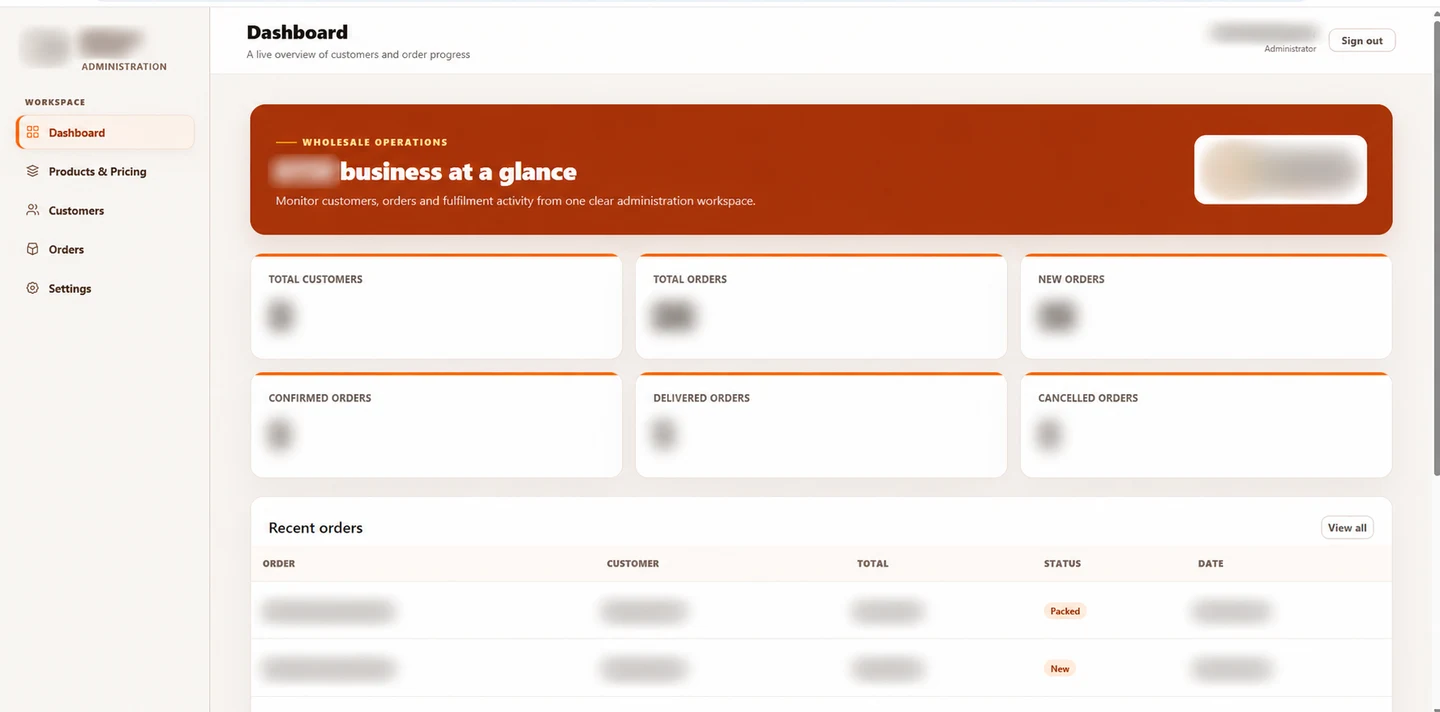
Dashboard: view customer and order totals, recent orders, and status summaries including new, confirmed, delivered and cancelled orders.
Product records
The product-creation form separates the name, unit and description from the product image and active status. Pricing is configured after the product record is saved. This gives the business a defined place to manage the catalogue information used by its ordering application.
Customer search
The customer list includes a search by name, mobile number or business. It shows registration information, order counts and account status, allowing the administration team to find the relevant buyer before opening the full record.
Individual customer records
A customer detail page brings contact information, saved addresses and that customer's order history together. The account deactivation control is available in the same context, so customer management is connected to the actual account being reviewed.
Order summaries
The dashboard presents total customers, total orders and separate order-status summaries. A recent-order table includes the order reference, customer, amount, status and date, helping the team move from a summary to the activity behind it.
Inside the web administration application
The dashboard presents customer and order activity. The product-management screen provides the catalogue workspace. Client identity and private operational details are obscured in these edited images.
Customer and order dashboardProducts and pricing management
How the mobile and web applications work together
1. Manage the catalogueThe business manages products and pricing through the web application.
2. Place an orderThe customer selects products, quantities and a delivery address in the mobile app.
3. Review business activityThe business reviews customers, orders and order progress through its administration workspace.
The backend connects the two applications, supporting the customer-facing ordering journey and the administration functions within the same solution.
Why the administration application matters
A mobile ordering interface is only one part of this project. The business also needs a practical way to manage what buyers see and to review what happens after they place an order. The web application provides that operational workspace.
The two interfaces have different priorities. Customers need product choices, quantities, addresses and their own order history. Administrators need a wider view of the catalogue, customer accounts and business activity. Connecting those roles is the central requirement of the delivered system.
End-to-end development and ongoing maintenance
Weform Solution handled development across the mobile app, web application and backend. Our involvement continues through management and maintenance of the delivered solution.
The result is a connected ordering and administration workflow: customers use the mobile app, while the business manages its catalogue, customers and orders through the web application.
Weform's development scope
Mobile application: the customer-facing product-selection and ordering experience.
Web application: the administration dashboard and interfaces for products, pricing, customers and orders.
Backend: the application services connecting the mobile and web experiences.
Ongoing responsibility: continued management and maintenance of the complete solution.
Having one development partner responsible for all three parts gives the project a single point of contact for work that spans the customer interface, administration screens and backend. A change to a business workflow can be considered across the connected system.
What the delivered system enables
The project provides a customer ordering channel and a business administration workspace within one connected solution, with ongoing management by Weform.
For buyers, the delivered functions cover browsing, pack and quantity selection, cart review, addresses and order history. For the business, they cover the catalogue, wholesale pricing, customer records and an overview of order activity.
These are the practical capabilities demonstrated by the project. They show the scope of the application without exposing the client's customer records, trading activity or internal account information.
Planning a similar application for your business
This project offers a useful reference for wholesalers, distributors and product-based businesses considering a customer app with a connected administration system. The right scope depends on how your customers buy and how your team manages those orders.
Before defining a similar project, we would discuss:
How products are organized and which units or pack sizes customers buy.
Whether pricing varies with the selected pack or quantity.
What customer account and delivery-address information is needed.
Which order stages the business needs to review.
What the customer should see in order history.
Who will manage the catalogue and maintain the application after delivery.
Those answers help define the mobile screens, web administration functions and backend requirements together. Additional integrations or functions can be discussed as part of a separate project scope.
Questions about this mobile and web application project
Did Weform develop the complete solution?
Yes. Weform Solution developed the mobile application, web administration application and backend end to end, and continues to manage and maintain the solution.
What can a customer do through the mobile app?
Customers can browse products, view pack-size options and wholesale rates, select quantities, review their cart, manage delivery addresses, place orders and view order history.
What can the business manage through the web application?
The business has a workspace for products and wholesale pricing, customer accounts, saved customer addresses, order records and dashboard summaries of customer and order activity.
Why does the project include a web application as well as a mobile app?
The mobile app serves buyers. The web application serves the team managing the catalogue, customer information and orders. The backend connects those parts of the business workflow.
Does Weform still manage the application?
Yes. Weform continues to manage and maintain the delivered solution. For a new project, the maintenance scope and support arrangement can be discussed with the development requirements.
Can you develop a similar system for a Mysore business?
Weform Solution is based in Mysore. We can discuss a similar mobile and web application around your catalogue, pricing, customer and ordering requirements, and define a scope for your business.
Can you share the client's name or customer information?
This case study is anonymous. The client's name, customer details and operational records are not published here.
Custom mobile and web application development in Mysore
Weform Solution is based in Mysore and develops custom applications for business requirements. This project demonstrates how a mobile interface for customers can be paired with a web application for the team managing the business.
If your requirement includes product catalogues, wholesale pricing, customer accounts, ordering or an administration dashboard, we can discuss the workflow and define an appropriate development scope.