
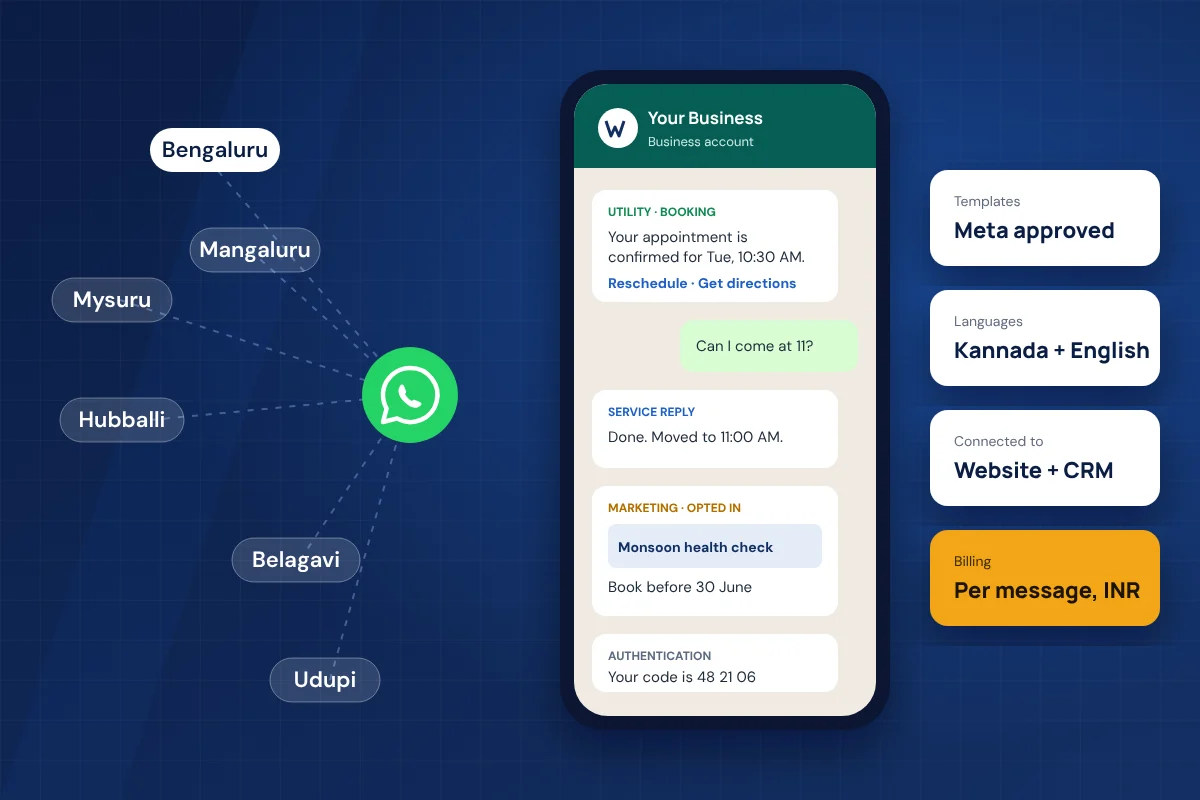
Customers across Karnataka already message businesses on WhatsApp: to ask about a flat in Whitefield, confirm a clinic slot in Jayanagar, check a homestay in Madikeri or chase an order from a wholesaler in Hubballi. The free WhatsApp Business App handles this well while one or two people reply by hand. Once enquiries come from ads, websites and several staff members at once, most businesses move to the WhatsApp Business API, officially called the WhatsApp Business Platform.
This guide is written for business owners and managers in Bangalore and across Karnataka who are comparing options in 2026. It uses Meta's current India rate card, the October 2026 pricing change and the latest policy updates, so you can plan a budget and ask providers the right questions.
What Is the WhatsApp Business API?
The WhatsApp Business API is Meta's platform for businesses that need WhatsApp messaging to work with software, automation and teams, rather than from a single phone.
With the API, a business can send pre-approved template messages to customers who have opted in, receive and answer customer messages from a shared inbox, build chatbot and WhatsApp Flows journeys, and trigger messages automatically from a website form, CRM, ecommerce store or booking system.
If you are still deciding between the free app and the API, read our comparison of the WhatsApp Business App vs WhatsApp Business API first.
Why Bangalore and Karnataka Businesses Are Moving to the API
Karnataka businesses usually move to the API when WhatsApp stops being a side channel and becomes the main way leads and customers reach them.
Bengaluru's startups, D2C brands, real estate developers, clinics and service companies run ads that send buyers straight into WhatsApp. Mysuru's schools, tour operators, hospitals and retailers handle seasonal spikes around admissions, Dasara and the tourist season. Coastal and north Karnataka businesses, from Mangaluru and Udupi to Hubballi-Dharwad and Belagavi, often serve customers who prefer to message in Kannada and expect a quick reply.
In each case the same problems appear on the Business App: one phone shared by several people, missed enquiries after office hours, no record of who replied, and no way to send booking or payment updates automatically. The API solves these by moving WhatsApp into proper business software.
WhatsApp API Use Cases Across Karnataka
The best first use case is usually the message your team already sends by hand many times a day.
| Region | Common businesses | Typical WhatsApp API use |
|---|---|---|
| Bengaluru | Startups, SaaS, D2C ecommerce, real estate, clinics, coaching | Ad lead follow-up, site-visit booking, order and delivery updates, OTPs, support inbox |
| Mysuru | Schools and colleges, hospitals, travel and tours, silk and handicraft retail | Admission enquiries, appointment reminders, tour confirmations, catalogue sharing |
| Mangaluru and Udupi | Hospitals, colleges, banks and finance, hotels | Patient reminders, fee and exam notices, payment alerts, booking confirmations |
| Hubballi-Dharwad and Belagavi | Manufacturing, wholesale and distribution, education | Dealer order updates, dispatch alerts, invoice and payment reminders |
| Kodagu, Chikkamagaluru, Hassan and Sakleshpur | Resorts, homestays, coffee estates, travel | Direct booking enquiries, check-in details, location and directions, guest follow-up |
For more examples, see our guide to WhatsApp Business API use cases and how Mysore businesses use WhatsApp API for customer communication.
WhatsApp Business API Pricing in India (2026)
Meta charges per delivered message, billed in rupees, and the rate depends on the template category. The rates below are Meta's India list rates before GST and before any provider fee.
| Message type | Used for | Meta rate (India, per message) |
|---|---|---|
| Marketing template | Offers, launches, festive campaigns, re-engagement, abandoned carts | ₹0.8631 |
| Utility template | Order, booking, payment, delivery and account updates | ₹0.1150 |
| Authentication template | OTPs and login or verification codes | ₹0.1150 |
| Service reply | Free-form replies within 24 hours of the customer's last message | First 1,000 per business number each month free, then ₹0.1150 |
What changed on 1 October 2026: Meta started charging for service replies after a free allowance of 1,000 per business phone number each month, and for utility templates sent inside an open 24-hour customer service window, which had been free since July 2025. If your team replies to a high volume of customer chats, include this in your budget.
Three more points matter for budgeting:
- GST: 18% GST applies on top of Meta's charges.
- Provider fee: your provider or platform usually charges a monthly fee, a per-message margin, or both. This is separate from Meta's rate.
- Rates change: Meta revises rate cards from time to time. Check the current card on WhatsApp Business Platform pricing before you finalise a budget.
Meta prices by the recipient's country code. A message to a +91 number costs the same whether you send it from Bengaluru, Mysuru or Belagavi.
What a Month Might Cost: Two Karnataka Examples
Working through your own message mix is the most reliable way to estimate cost. These two examples use Meta's India rates only, so add your provider's fee on top.
| Bengaluru multi-speciality clinic | Messages | Meta charge |
|---|---|---|
| Appointment confirmations and reminders (utility) | 3,000 | ₹345.00 |
| Health check campaign to opted-in patients (marketing) | 1,500 | ₹1,294.65 |
| Replies to patient questions (service) | 2,500, of which 1,000 free | ₹172.50 |
| Total before GST | ₹1,812.15 | |
| Total with 18% GST | ₹2,138.34 |
| Coorg homestay | Messages | Meta charge |
|---|---|---|
| Booking confirmations and check-in details (utility) | 400 | ₹46.00 |
| Seasonal offer to past guests who opted in (marketing) | 300 | ₹258.93 |
| Replies to guest enquiries (service) | 700, all within the free 1,000 | ₹0.00 |
| Total with 18% GST | ₹359.82 |
The pattern is clear: marketing messages drive most of the bill, while utility updates and replies stay cheap. Send campaigns to people who have opted in and are likely to respond, and keep transactional updates as utility templates.
Kannada and English Message Templates
Kannada is a supported template language, so Karnataka businesses can send approved templates in Kannada, English or both.
A common approach is to create the same template in English and Kannada and send the version that matches what the customer chose on your website form or in their first message. This works well for clinics, schools, government-facing services, cooperative banks and retail businesses outside central Bengaluru.
- Keep the wording natural rather than machine translated; customers notice.
- Check that variables such as names, dates and amounts read correctly in both languages.
- Submit each language version for approval; each is reviewed on its own.
- Use the same category for both versions so pricing stays predictable.
How to Set Up WhatsApp Business API in Bangalore or Anywhere in Karnataka
Setup is mostly paperwork and planning; the technical connection is the quicker part.
| Step | What happens | What you need |
|---|---|---|
| 1. Meta business portfolio | Create or use your Meta business portfolio (Business Manager) | Admin access, business email |
| 2. Business verification | Meta verifies your legal business details | Matching registration documents such as GST or incorporation certificate, website and address |
| 3. Phone number | Register a number for the API | A number that can receive an SMS or call for verification |
| 4. Display name | Meta reviews the name customers will see | A name that matches your brand and website |
| 5. Templates | Write and submit marketing, utility and authentication templates | Final message wording and button text |
| 6. Integration | Connect WhatsApp with your website forms, CRM, store or booking system | Access to those systems, or a developer |
| 7. Testing and launch | Test every journey, opt-in and handover to staff | A small internal test group |
Most delays come from business verification documents that do not match the details on the website, or from template wording that does not fit the chosen category. Getting these right early saves days.
If the number you want to use is already on the WhatsApp Business App, it can usually be moved to the API, but plan the switch carefully because the app's chat history does not carry across in the same way.
Rules and Compliance for Karnataka Businesses
The API is legal and widely used in India, but a few rules decide whether your account stays healthy.
- Opt-in: only message customers who have agreed to hear from you on WhatsApp. Record where and when they opted in, for example on your website form or at your clinic counter.
- Templates and the 24-hour window: to start a conversation you need an approved template. Within 24 hours of a customer's last message you can reply freely.
- Quality rating: if many people block or report your messages, Meta can lower your quality rating and limit how many customers you can reach. Relevant, expected messages protect your account.
- AI chatbots: from 15 January 2026, Meta no longer allows general-purpose AI assistants on the Business Platform. Business bots for support, bookings, orders and enquiries are still allowed.
- Data protection: the Digital Personal Data Protection Rules, 2025 were notified in November 2025 and come into force in phases up to May 2027. Collect only the data you need, explain how you use it and make opting out easy.
- SMS is different: TRAI DLT registration applies to SMS, not WhatsApp. If you send both, see our guide on WhatsApp API vs bulk SMS.
The Verified Badge (Formerly the Green Tick)
The verified badge helps customers trust that a message really comes from your business, but it is not required to use the API.
Every API account should complete Meta business verification. Beyond that, businesses on the API can apply for an Official Business Account, which Meta grants based on notability such as press coverage, and Meta also offers a paid Meta Verified option. The badge that used to be green now appears in blue, in line with Meta's other apps. A clear display name, a complete business profile and well-written templates do more for trust in the first months than the badge alone.
How to Choose a WhatsApp Business API Provider in Karnataka
The best provider for a Bangalore or Karnataka business is the one that keeps you in control of your account, shows costs clearly, and can connect WhatsApp with the systems you already use.
Ask every provider for a written quote that separates Meta's message charges, GST, the platform fee and any setup or integration cost. A low monthly fee with a high per-message margin can cost more than a higher fee at Meta's list rate, especially for marketing campaigns.
For Bengaluru businesses, our WhatsApp Business API services in Bangalore page explains setup, campaigns, automation and integration in detail. Businesses in and around Mysuru can start with our WhatsApp Business API provider in Mysore page, and our guide on how to choose a WhatsApp API service provider covers the evaluation in more depth.
Common Mistakes to Avoid
Most WhatsApp API problems in the first three months come from sending too much, too soon.
- Uploading an old contact list and sending a campaign to people who never opted in.
- Writing promotional content into a utility template; Meta may re-categorise it at the marketing rate.
- Launching without a plan for who answers replies, which leads to slow responses and unhappy customers.
- Building a chatbot with no way to reach a person. See our chatbot human handover checklist.
- Letting WhatsApp enquiries sit outside the CRM, which creates duplicates. Our guide on preventing duplicate WhatsApp CRM enquiries explains the fix.
- Forgetting the October 2026 change and budgeting service replies as free.
How Weform Solution Helps Karnataka Businesses
Weform Solution is a Mysore-based team that builds websites, web applications and business messaging, so WhatsApp can be planned as part of your full customer journey.
We help businesses in Bengaluru, Mysuru and across Karnataka plan their WhatsApp use cases, prepare verification details, write clear templates that fit Meta's rules, and connect WhatsApp with website forms, landing pages, CRMs and booking systems. Because we also build and maintain websites, enquiry forms and WhatsApp follow-up can be designed together instead of patched together later.
Planning WhatsApp Business API for Your Business?
Share how customers contact you today, which messages your team sends by hand, and which systems you use. Weform Solution can suggest a practical first setup, estimate monthly message costs and plan the integration.
Key Takeaways
- Meta's India rates are ₹0.8631 per marketing message and ₹0.1150 per utility or authentication message, plus 18% GST.
- Since 1 October 2026, service replies are free for the first 1,000 per number each month and then charged at the utility rate.
- Pricing is the same across Bengaluru, Mysuru, Mangaluru, Hubballi and every other Karnataka city.
- Kannada templates are supported, which helps businesses serving customers outside central Bengaluru.
- Opt-in, the right template category and a plan for human replies protect your account quality.
- Choose a provider that keeps the account and number in your name and shows costs separately.
Frequently Asked Questions
How much does WhatsApp Business API cost in Bangalore?
Meta charges per delivered message in INR. On the India rate card, a marketing message costs ₹0.8631 and a utility or authentication message costs ₹0.1150, plus 18% GST. Since 1 October 2026, service replies are free for the first 1,000 per business number each month and then charged at the utility rate. Your provider's platform fee is separate, so ask for it in writing.
Is the WhatsApp Business API price different in Mysuru, Mangaluru or Hubballi?
No. Meta prices messages by the recipient's country code, not by city, so a message to a +91 number costs the same whether your business is in Bengaluru, Mysuru, Mangaluru or Hubballi. Provider fees and setup charges can differ.
Can I send WhatsApp templates in Kannada?
Yes. Kannada is one of the languages supported for WhatsApp message templates. Many Karnataka businesses keep an English and a Kannada version of the same template and send the one that matches the customer's preference.
How long does WhatsApp Business API setup take?
Technical setup can be quick, but the overall timeline depends on Meta business verification, display name approval, template approval and any website or CRM integration. Plan for a few days to a couple of weeks, and longer if verification documents need correction.
Can I use my existing WhatsApp number for the API?
Often yes. A number currently on the WhatsApp Business App can usually be moved to the Business Platform, but the app chat history does not come across in the same way, so plan the switch carefully. Numbers already on another provider can be migrated with that provider's cooperation.
Do I need DLT registration for WhatsApp messages?
No. TRAI DLT registration applies to SMS. WhatsApp Business API messages are governed by Meta's policies and template approval instead. If you send both SMS and WhatsApp, you still need DLT for the SMS side.
Are AI chatbots allowed on WhatsApp Business API in 2026?
Business chatbots for support, bookings, orders and enquiries are allowed. From 15 January 2026, Meta stopped allowing general-purpose AI assistants whose main purpose is open-ended AI chat. A clinic's appointment bot or a retailer's order bot is a business use case and is not affected.
How do I get the verified badge on WhatsApp?
Start with Meta business verification. Businesses on the API can apply for an Official Business Account, which Meta grants based on notability, and Meta also offers a paid Meta Verified option. The badge now appears in blue rather than the older green tick.
References
Published by Weform Solution
Weform Solution provides website development, business messaging and digital solutions for businesses in Mysore, Bangalore and across Karnataka. Learn more about Weform Solution.
Talk to Us About WhatsApp for Your Business
Tell us your city, industry and the messages you want to automate. We will reply with a practical next step.