Custom ERP software for Mysore and Bangalore businesses.
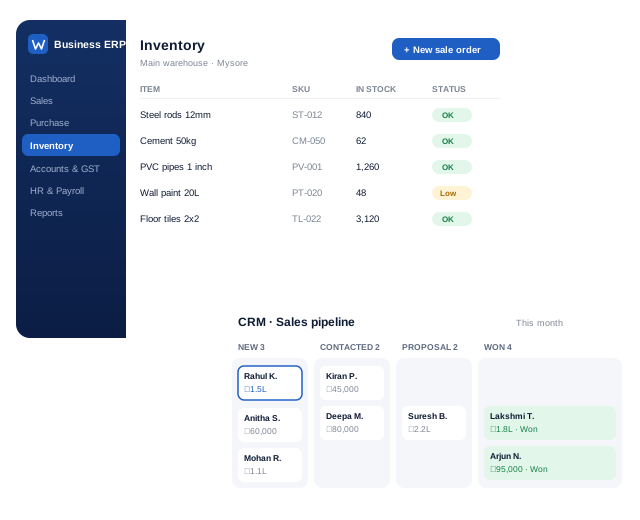
We build ERP systems that connect orders, inventory, purchase, production, dispatch, billing and reports in one place, designed around your actual process instead of a generic template.
What does custom ERP software from Weform include?
Weform Solution builds custom ERP software for businesses in Mysore, Bangalore and across Karnataka. A typical system brings orders, inventory, purchase, production, dispatch, billing and reports into one web application, with a login and the right access for each team. It is usually rolled out one module at a time, so your team can keep working while it goes live.
When a business needs ERP software
Most growing businesses start with spreadsheets, accounting software and phone calls. That works until orders, stock, purchase and production start depending on each other and nobody has one clear picture of what is pending, what is in stock and what is owed.
Stock figures in the warehouse never match the books.
Orders, dispatch and billing are tracked in different places.
Month-end reports take days and are still not trusted.
Branches or teams cannot see the same live information.
Your accounting software handles finance well but not your operations.
ERP modules we build
Sales and orders
Quotations, sales orders, order status and customer history.
Inventory
Stock levels, movements, batches, reorder alerts and multiple locations.
Purchase
Purchase requests, purchase orders, supplier records and goods receipt.
Production
Bills of materials, job cards, work orders and material consumption.
Dispatch and delivery
Packing, dispatch, vehicle and delivery tracking.
Billing and payments
Invoices, receipts, outstanding tracking and exports for your accountant.
Frequently asked questions
What is ERP software?
ERP (Enterprise Resource Planning) software connects the core operations of a business, such as sales, inventory, purchase, production, dispatch and billing, in one system so everyone works from the same live data.
Do small and medium businesses need ERP?
Not always. If your accounting software and spreadsheets still give you a clear picture, you may not need ERP yet. It becomes worth it when orders, stock and production are hard to track across people, locations or departments.
Can a custom ERP work alongside Tally?
Yes. Many businesses keep their accounting software for finance and statutory work while a custom ERP handles operations, with data exported or shared between them.
Accounting software, ready-made ERP or custom ERP?
The right choice depends on how complex your operations are, not only on company size.
Need
Accounting software (e.g. Tally)
Ready-made ERP
Custom ERP
GST invoicing, accounts, returns
Strong
Usually included
Usually connected to your accounting software
Your own order and approval workflow
Limited
Configurable within limits
Built exactly for your process
Production, job cards, BOM
Basic
Often available
Built to your shop-floor process
Branch and field-team access
Depends on setup
Yes
Yes, browser and mobile
WhatsApp, SMS and website integration
Limited
Varies by vendor
Built in
Cost pattern
Licence and renewals
Licences per user and modules
Build cost, then hosting and support
Many businesses keep their accounting software for finance and statutory work and use a custom ERP for operations. Read our guide: ERP vs Tally for growing businesses.
Industries we build ERP software for
Manufacturing
Bills of materials, work orders, job cards, raw material consumption and finished goods.
Wholesale and distribution
Dealer orders, pricing, stock across godowns, dispatch and outstanding tracking. See our wholesale ordering case study.
Trading and retail chains
Purchase, stock transfers between stores, sales and reorder alerts.
Food and FMCG
Batches, expiry dates, production planning and distributor orders.
Service and maintenance companies
Service contracts, AMC renewals, technician jobs and spare parts.
Travel and transport
Bookings, fleet, drivers, trip sheets and billing.
How we build your ERP
1. Process study
We map how orders, stock, production and billing flow today, and where time and money are lost.
2. Module plan
We agree which module goes first and what comes in later phases.
3. Screen design
You review the key screens and reports before development.
4. Development in phases
Each module is built, demonstrated and refined with your team.
5. Data migration and training
Opening data is imported and every role is trained.
6. Go-live and support
Launch, monitoring, fixes and new modules as you grow.
What affects ERP cost and timeline
We quote after understanding your scope. These factors make the biggest difference:
Number of modules and how complex the business rules are.
Number of users, roles, branches and warehouses.
Reports and dashboards needed by management.
Integrations with accounting software, WhatsApp, SMS, payment gateways or e-commerce.
Data migration from Excel or older software.
Need for a mobile app for field or warehouse staff.
Why choose Weform Solution
Operations first
We start from your shop floor, godown and sales desk, not from a software template.
Connected messaging
Our own WhatsApp Business API and SMS services make alerts and reminders part of the ERP.
Experienced leadership
Weform Solution is led by our founder, who has over 10 years of hands-on experience in digital services.
One team for web, apps and messaging
Websites, web and mobile applications, hosting, business email, WhatsApp API and SMS from one team, so nothing falls between vendors.
Based in Mysore
Local to Mysore and serving Bangalore and the rest of Karnataka, with in-person meetings when useful and clear online updates.
ERP software questions
How is custom ERP different from ready-made ERP products?
Ready-made ERP products come with fixed modules and workflows that your team adapts to, often with per-user licences. A custom ERP includes only the modules you need, follows your own process and reports, and can grow module by module.
How long does ERP development take?
It depends on the number of modules, users, locations and integrations. We recommend starting with the module that causes the most pain, such as orders and inventory, releasing it first, and adding further modules in phases.
Can our existing data be imported?
Yes. Customer, product, supplier and opening stock data from Excel or older software is cleaned, mapped and imported before go-live.
Will the ERP work on mobile and across branches?
Yes. It runs in the browser with role-based logins, so staff at different branches, warehouses or in the field can use it. A mobile app can be added for field teams.
Can the ERP send WhatsApp or SMS alerts?
Yes. Order confirmations, dispatch updates, payment reminders and low-stock alerts can be sent through WhatsApp Business API, SMS or email.
Who owns the software and the data?
Your business data belongs to you. Code ownership, hosting and handover terms are agreed in writing before the project starts.